> For the complete documentation index, see [llms.txt](https://docs.mindkosh.com/llms.txt). Markdown versions of documentation pages are available by appending `.md` to page URLs; this page is available as [Markdown](https://docs.mindkosh.com/ja/guan-li/dtasetto.md).
# データセット
データセットを使って生データを管理します。
画像、点群、ビデオを含むすべての生データはデータセットを通じて管理されます。データセット内の各ファイルにタグを追加して、異なるサブセットに整理できます。
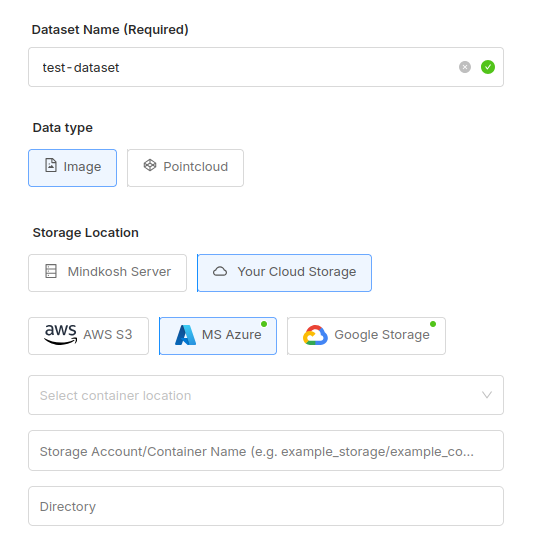
データセットを作成するには、アップロードしたいデータの種類と、どこにアップロードするかを選択してください。
データセットには複数回データをアップロードできます。 [**このガイドをチェックしてください**](/ja/guan-li/dtasetto/dtanoappurdo.md) **Mindkosh にデータを追加するさまざまな方法を見るために。**
アップロードが完了すると、一覧で確認でき、タグでフィルタできます。
{% hint style="info" %}
アップロードしたデータにラベリングを開始するには、タスクを作成してデータセットを添付する必要があります。 [このガイドをチェックしてください](/ja/guan-li/tasuku.md#creating-a-new-task) タスクを作成する方法を見るには。
{% endhint %}
### タグの使用
タグは Mindkosh でデータを整理するのに最適な方法です。例えば、マルチモーダルデータがある場合、各センサーからのデータに特定のタグを付けて簡単に識別できます。
{% hint style="success" %}
各ファイルに複数のタグを追加できます
{% endhint %}
タグの別の使い方は、データを意味のある方法でセグメント化することです。例えば、特定の日に取得したデータをアップロードしていると想像してください。各日のデータに特定のタグを付けることで、特定の日に取得されたファイルを簡単に識別できます。これらのタグは、その特定の日のデータを別々のタスクでラベル付けするために使用できます。