> For the complete documentation index, see [llms.txt](https://docs.mindkosh.com/llms.txt). Markdown versions of documentation pages are available by appending `.md` to page URLs; this page is available as [Markdown](https://docs.mindkosh.com/ko/management/quality-management.md).
# 품질 관리
Mindkosh의 품질 관리 도구를 사용하여 고품질 데이터셋을 만드는 방법
작업을 생성할 때 주석을 달 때 적용할 품질 수준을 선택할 수 있습니다.
모든 작업에는 최소한 주석(Annotation, L1) 모드가 있습니다. 완료되면 각 배치는 완료로 표시될 수도 있습니다.
추가로, 다음을 추가할 수 있습니다
1. 검증 모드(Validation, L2)
2. 품질 검사 모드(Quality Check, L3)
이러한 모드들 중 어떤 조합이든 선택할 수 있습니다.
확인(Checkout) [권한](/ko/management/quality-management/permissions.md)어떤 사용자가
1. 주석을 달기 위해 배치에 접근할 수 있는지 확인합니다.
2. 배치를 다른 모드로 이동합니다.
3. 검토(리뷰)를 생성합니다.
### 검토
사용자는 검토를 통해 배치 담당자(Assignees)에게 피드백을 줄 수 있습니다. 검토를 사용하여 다음을 수행할 수 있습니다:
1. 주석 품질을 평가합니다(10점 척도).
2. 배치를 수락합니다. 이 경우 배치는 완료로 표시됩니다.
3. 배치를 거부합니다. 이 경우 배치는 주석 모드로 되돌아갑니다.
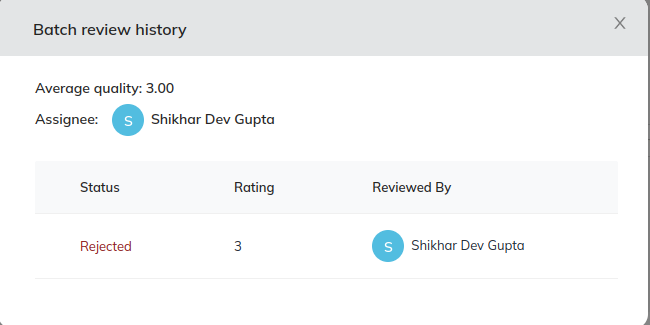
여러 워크플로우를 통해 품질 검사를 수행하면서 여러 검토를 게시할 수 있습니다. 새 검토를 만들면 해당 배치에 생성된 모든 검토를 볼 수 있습니다.
특정 배치에 대한 검토 기록 버튼을 클릭하면 작업 페이지에서 직접 검토 기록을 볼 수도 있습니다.